|
|
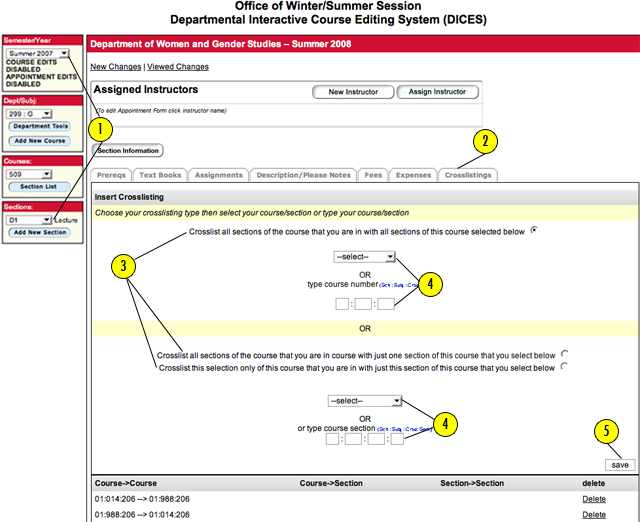
Creating Course Crosslistings
- First, select the appropriate "SEMESTER/YEAR", "DEPARTMENT/SUBJECT", "COURSE" and "SECTION" (located on the left side of the page) for the course you would like to create a crosslisting for.
- Click on the "CROSSLISTINGS" tab.
- Select crosslisting type.The first option allows you to crosslist the course your are currently viewing and all its sections (see the course number in the left nav bar) with all sections of the selected or entered course. The second option allows you to crosslist the course your are currently viewing and all its sections (see the course number in the left nav bar) with only one selected or entered section. The final option allows you to crosslist only the course section your are currently viewing (see the course section number in the left nav bar) with only one selected or entered section.
- Enter crosslistings using the drop downs or by manually typing them in.
- Click on the "SAVE" button.
|
