|
Help Center
System Preferences:
- Internet Explorer 6.0 + or Firefox 1.5
- Adobe Flash Player
- Javascript Enabled
- High Speed Internet Connection Preferred
How Do I:
|
|
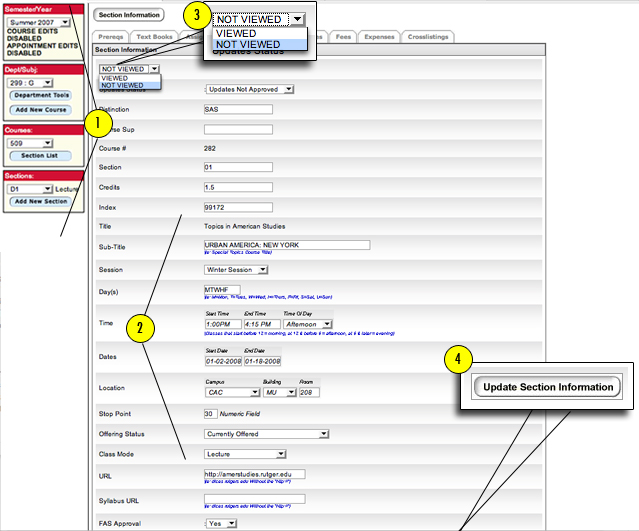
Reviewing/Editing a Course/Section
- On the left hand side of the screen, select the appropriate "SEMESTER/YEAR", "DEPARTMENT/SUBJECT", "COURSE", and "SECTION."
- You will then be directed to the main screen for the course you have chosen.
- Once you have finished reviewing/editing the information, you may change the status from "NOT VIEWED" to "VIEWED."
- Click on "UPDATE SECTION INFORMATION" to save any changes.
|
Have we answered all of your questions? If not, please submit your question below:
|
|
