Division of Continuing Studies
Help Center

System Preferences:

  • Internet Explorer 6.0 + or Firefox 1.5
  • Adobe Flash Player
  • Javascript Enabled
  • High Speed Internet Connection Preferred

How Do I:

  Add new course
Add new section
Add new text books
Assign an instructor to a course
Create and change fees
Create assignments
Create course crosslistings
Create a course description and add a "please note"
Login
Logout
Modify an existing instructor's Appointment Form
Modify a course description and "please note"
Modify existing assignments
Modify existing text books
Modify offering status of a course
Review/Editing a Course/Section
Search by instructor name
Search by instructor SSN
Set up new instructor
Unassign an instructor from a course
View department reports
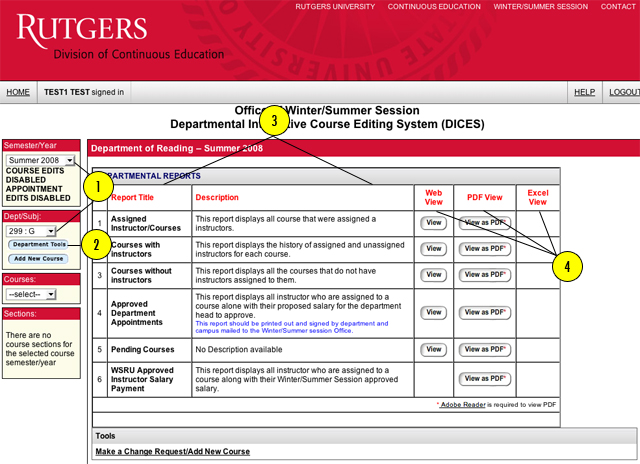
Viewing Department Reports
  1. First, select the appropriate "SEMESTER/YEAR" and "DEPARTMENT/SUBJECT."
  2. Under the "departments" drop down, click on "DEPARTMENT TOOLS."
  3. You will then be directed to a list of available reports.
  4. Select "VIEW" or "VIEW AS PDF" (Reports may be viewed in a browser, Excel or as a PDF).

Have we answered all of your questions? If not, please submit your question below:

*First Name:
*Last Name:
*E-mail:
*Phone Number:
*Comments
*Required Field