|
Help Center
System Preferences:
- Internet Explorer 6.0 + or Firefox 1.5
- Adobe Flash Player
- Javascript Enabled
- High Speed Internet Connection Preferred
How Do I:
|
|
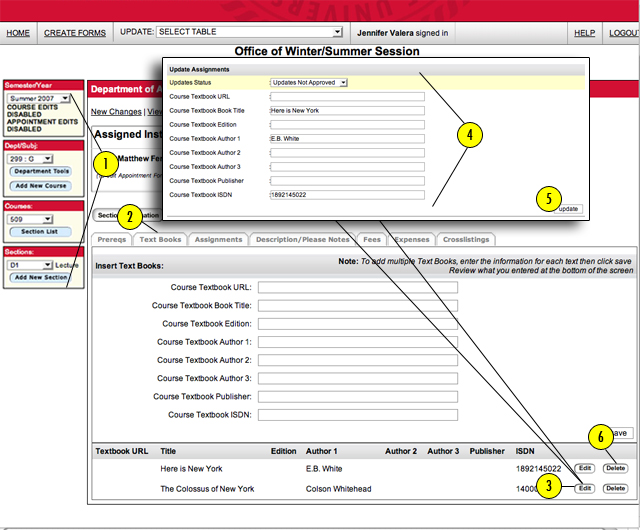
Modifying Existing Text Books
- First, select the appropriate "SEMESTER/YEAR", "DEPARTMENT/SUBJECT", "COURSE", and "SECTION" (located on the left side of the page).
- Click on the "TEXTBOOKS" tab.
- Select the "EDIT" button next to the textbook you would like to edit.
- Make the appropriate changes in the edit text fields.
- Be sure to click on the "SAVE" button (located at the lower right corner).
- To delete textbooks, click on the "DELETE" button located nexto to the textbook you would like to delete.
|
Have we answered all of your questions? If not, please submit your question below:
|
|
